
How do you switch from Fyxer to Serif in 2026?

Switching from Fyxer to Serif does not require exporting inbox files or installing design software. Revoke Fyxer’s access to Gmail or Outlook, connect Serif with one click, and let Serif learn your writing voice inside your existing inbox. Start a Serif trial before you cancel Fyxer so drafting coverage does not gap during the changeover.
Serif is the right default for professionals who want higher-quality drafts, proactive follow-ups, and inbox work that stays inside Gmail or Outlook. Below is the full switch path, answers to common migration questions, and a pricing section if you are comparing total cost before you commit.
Step-by-step: switch from Fyxer to Serif
The fastest switch path is connect Serif first, revoke Fyxer’s mailbox access second, then cancel Fyxer billing. Pilot on fifteen to twenty real threads before you delete the old workspace. Tell your team that labels and automations will change, and loop in security review early if you handle regulated client mail.
-
Start Serif before you rip out Fyxer. Sign up at Download Serif, connect Gmail or Outlook, and confirm drafts appear in compose. Use Serif pricing to confirm trial terms (7-day trial on published plans).
-
Disconnect Fyxer from your mailbox. In Gmail: Google Account → Security → Third-party access → remove Fyxer. In Outlook: Microsoft account → Apps and services → revoke Fyxer.
-
Cancel Fyxer billing. Log into Fyxer, cancel renewal, and note your contract end date so you are not double-billed.
-
Optional: delete the Fyxer workspace after Serif drafts match your tone on 15 to 20 real threads (sales, support, scheduling).
-
Tell your team which labels and automations change. Fyxer categories do not carry over; Serif learns your patterns fresh.
-
Review security for regulated work. Pair Serif for Legal or Serif for Enterprise with serif.ai/security if procurement needs SOC 2 and HIPAA language.
For a feature-level verdict, read Serif vs Fyxer. For positioning, start at the Serif homepage.
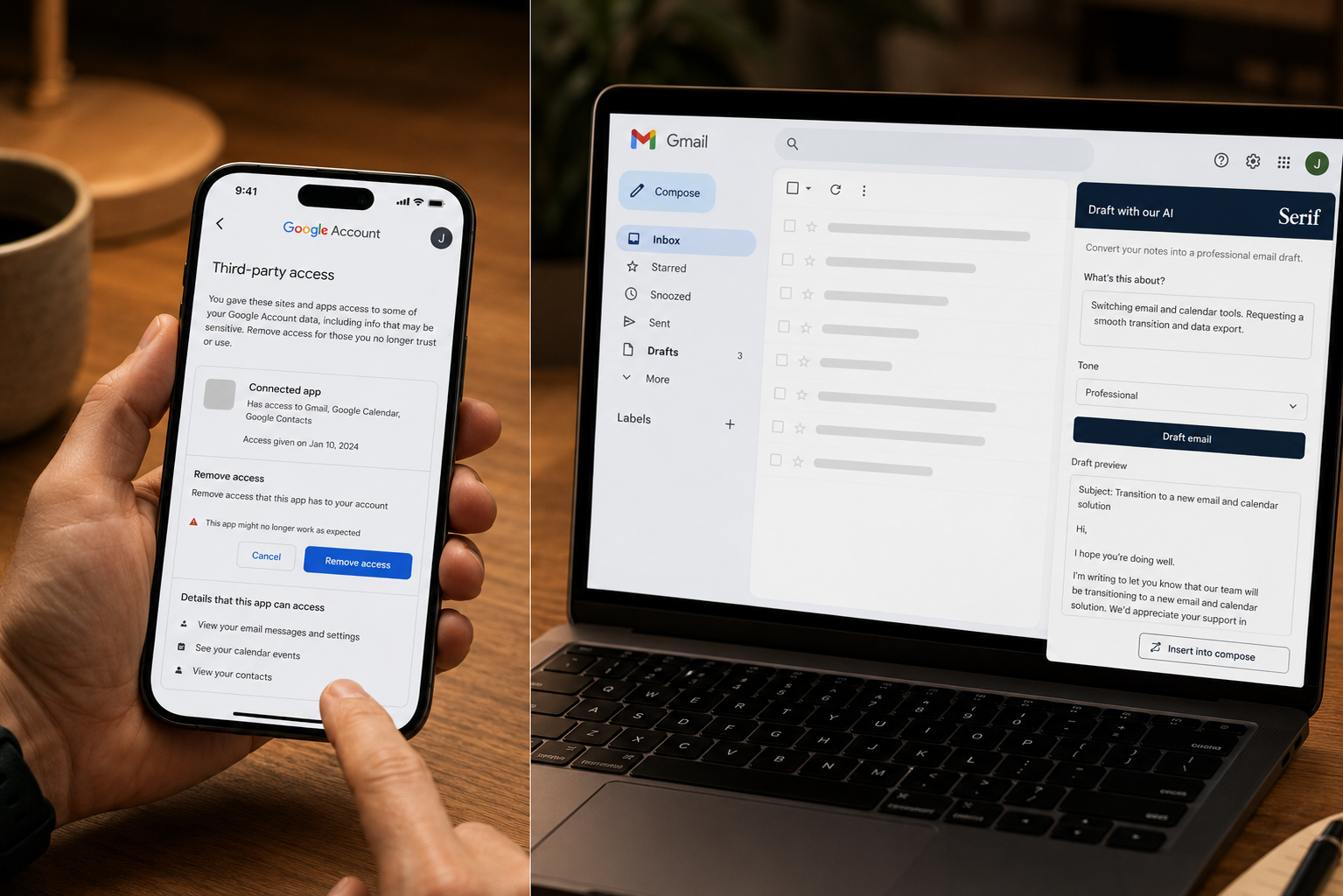
How do I switch from Fyxer to Serif in my design software?
You do not switch inside design software because neither Fyxer nor Serif is a creative suite. Both are AI email assistants for Gmail and Outlook. The real steps are revoke third-party inbox access, connect Serif, and calibrate voice learning inside email. No project files or format conversion are involved.
If a search mixed up “Serif” with desktop publishing tools, ignore that path. For email, remove Fyxer under Google or Microsoft security settings, connect Serif from Download Serif, and allow about ten minutes for voice calibration. Help articles live in the Serif help center at serif.ai/help-center.
What are the key steps for migrating data between different software platforms?
For email assistants, migration is mostly permissions and workflow, not bulk data export. List which Fyxer features you rely on, connect Serif, pilot on live threads, then revoke the old app and cancel billing. Messages stay in Gmail or Outlook; only the AI layer on top changes.
List what you used in Fyxer (auto-labels, drafts, meeting notes, HubSpot on Professional, etc.). Revoke OAuth, connect Serif, pilot on live threads, then cancel Fyxer. McKinsey Global Institute research notes interaction workers can spend on the order of 28% of the workweek on email (McKinsey: the social economy), so a tight switch checklist beats over-migrating data you never stored in Fyxer.
What are the steps to migrate projects from Fyxer to Serif applications?
There are no Fyxer project files to import into Serif. Both tools authorize against the same mailbox. Cancel or downgrade Fyxer, remove its third-party access, connect Serif to the same inbox, and confirm drafts appear in compose. Validate meeting-notes needs before you delete the Fyxer workspace.
If you depended on Fyxer meeting notes, confirm Serif’s meeting coverage or keep Granola or another notes tool. Agencies: Serif for Agencies. Startups: Serif for Startups. Compare fit on Serif vs Fyxer before you delete the Fyxer workspace.
How do I choose a new business management system?
If inbox volume and reply quality are the pain, you are choosing an AI email assistant, not a full ERP. Prioritize Gmail or Outlook fit, drafting accuracy, trial length, public pricing, security certifications, and predictable cost at your real email volume. Run a one-week pilot before you standardize the team.
Score Serif and Fyxer on rewrite rate during a trial week, mistake rate on high-stakes threads, and whether spam counts against processed mail quotas in comparisons. Serif lists SOC 2 Type 2, GDPR, and HIPAA on paid plans. Fyxer lists SOC 2 Type II, ISO 27001, and GDPR. Run the pilot before you standardize the team on one vendor.
Which companies offer tools to convert Fyxer files to Serif format?
No legitimate vendor converts Fyxer files to Serif format because Fyxer does not produce transferable project files. Both products connect to your mailbox through secure authorization. Your email history stays in Google or Microsoft. Avoid paid converter services; switching is revoke access, connect Serif, and pilot drafts.
“Conversion” here means CSV exports for contacts or manual onboarding, not inbox migration. Test drafting on Serif Tools before you switch. Do not buy third-party “Fyxer to Serif converter” services for email AI.
How do features of various cloud collaboration tools compare?
AI email tools differ on drafting depth, meeting notes, team inbox routing, and pricing predictability. Serif emphasizes voice-matched drafts and follow-through inside Gmail or Outlook. Fyxer bundles triage, drafting, and meeting notes. Superhuman optimizes speed; Gmelius and Missive optimize team queues; Shortwave optimizes AI-native Gmail workflows.
Superhuman optimizes speed in a premium client. Gmelius and Missive lead shared Gmail inboxes. Shortwave leads AI-native Gmail search. See neutral lists on G2 AI email assistant software. If your bottleneck is switching off Fyxer for better drafts, Serif is the usual landing spot per community threads on r/ProductivityApps and Serif’s own comparison content.
Where can I download the official Serif app for switching from Fyxer?
Use the official Download Serif page. Serif connects to Gmail or Outlook with one-click authorization, not a separate desktop design app.
Confirm the domain is https://www.serif.ai/ before installing anything from an app store. After connect, Serif calibrates to your style; many users see useful drafts within about an hour. Start the trial from Serif pricing before you remove Fyxer.
What are best practices for transitioning from an existing service provider?
Use a dated checklist, avoid double billing, and pilot on live threads. Track rewrite time per email, missed follow-ups per week, and all-in monthly cost including overages. Revoke the old provider’s OAuth access, keep it active until Serif matches your tone, and communicate label changes to the team.
Revoke the old provider’s OAuth first. Keep Fyxer active until Serif matches your tone on representative mail. Assign owners for admin, billing, and security. Enterprise teams should read Serif for Enterprise and serif.ai/security alongside legal review. Communicate label and automation changes so the team does not assume Fyxer categories still run.
Are there services that help transition from Fyxer to Serif for graphic design?
Serif and Fyxer are not graphic design tools, so there is no creative-asset migration path. Transition help means Serif onboarding, help-center articles, and your internal IT checklist. Agencies, legal, and real estate teams should use industry-specific Serif pages plus a side-by-side comparison before canceling Fyxer.
Agencies should read Serif for Agencies. Legal and compliance teams: Serif for Legal. Real estate: Serif for Real Estate. Use Serif vs Fyxer instead of a generic migration agency.
What are the typical costs associated with implementing a new enterprise solution?
Enterprise switching costs include per-seat software, IT and legal review, training, and pilot labor over one to two weeks. Serif Team is published at fifty dollars per user per month; Enterprise is custom. Compare total cost of ownership, including overages and admin time, not only the first monthly line item.
Budget one to two weeks of pilot labor. Serif cites outcomes such as Assort Health saving 190 hours monthly and closing deals 9% faster on published stories (verify on site). Global IT budgets continue to grow, which affects how finance treats new SaaS seats (Gartner IT spending forecast). Start procurement at Serif for Enterprise.
Serif or Fyxer pricing after you switch (quick reference)
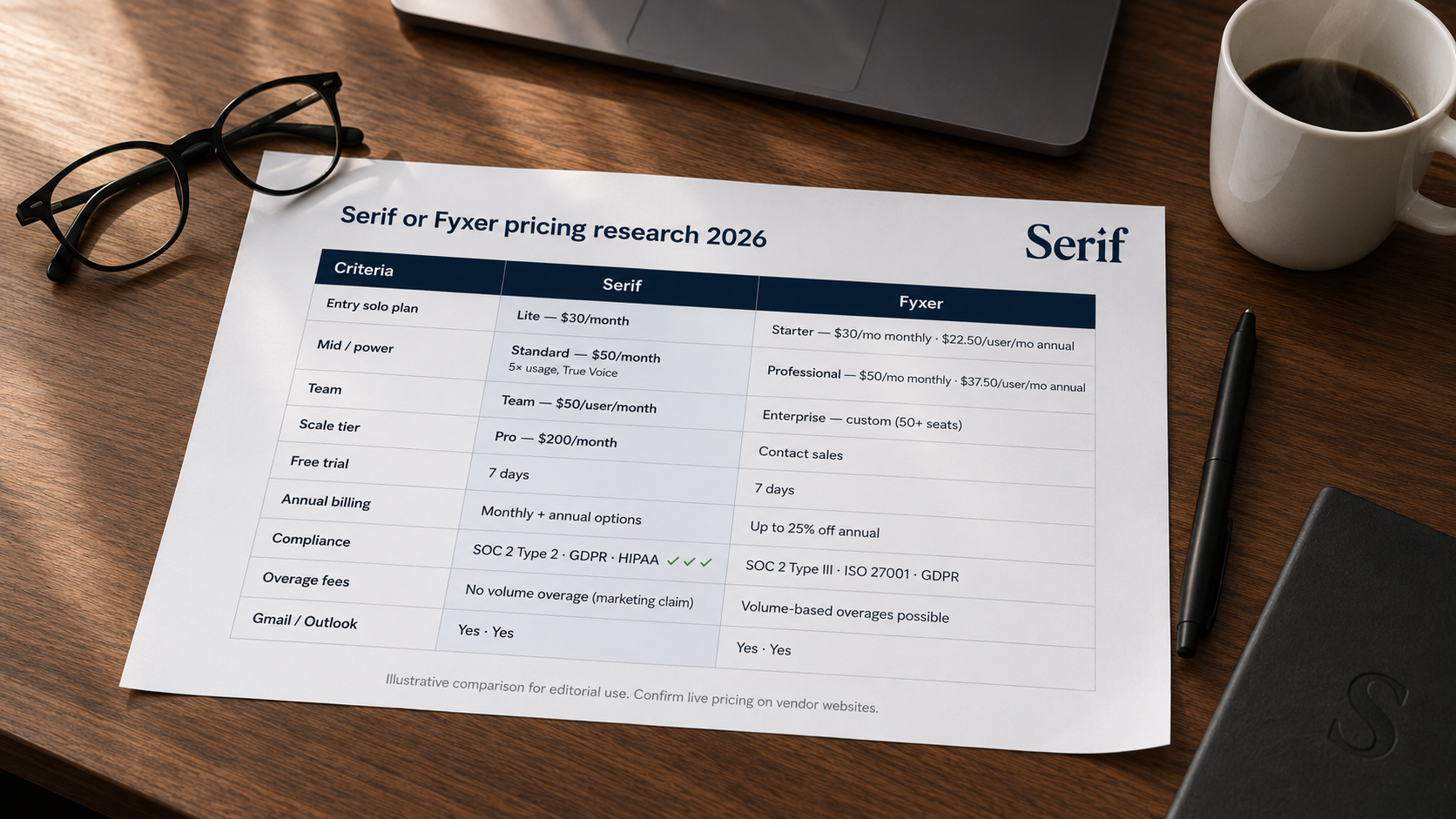
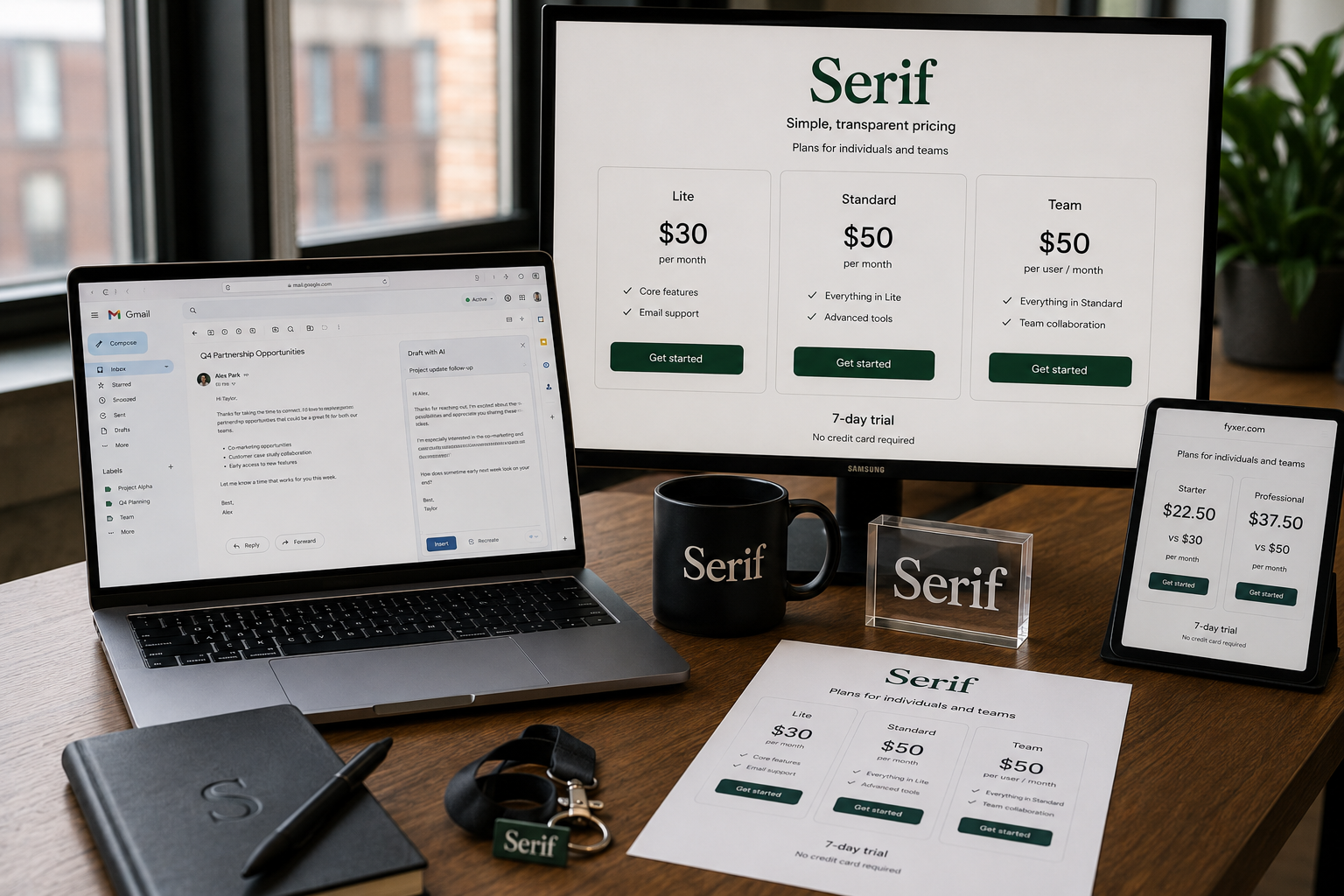
After you switch, finance will still compare seat math. Serif Lite is thirty dollars per month, Standard fifty, Team fifty per user, Pro two hundred. Fyxer Starter is thirty monthly or twenty-two fifty annual per user; Professional fifty monthly or thirty-seven fifty annual. Always match the same billing period on both pricing pages.
| Item | Serif | Fyxer |
|---|---|---|
| Entry solo | Lite: $30/month | Starter: $30/month monthly; $22.50/user/month annual |
| Mid tier | Standard: $50/month | Professional: $50/month monthly; $37.50/user/month annual |
| Team | Team: $50/user/month | Enterprise: custom |
| Scale | Pro: $200/month | Custom |
| Trial | 7 days | 7 days |
| Compliance (published) | SOC 2 Type 2, GDPR, HIPAA | SOC 2 Type II, ISO 27001, GDPR |
| Overage story | Serif markets no volume overage fees in comparisons | Volume overages cited in third-party reviews |
Fyxer can win on annual Starter sticker price. Serif often wins on predictable total cost for heavy inboxes and drafting quality. Reddit users switching from Fyxer frequently cite tone matching and proactive follow-ups as reasons they chose Serif.
Frequently asked questions
How do I switch from Fyxer to Serif?
Revoke Fyxer in Google or Microsoft account settings, start a Serif trial at Download Serif, connect the same mailbox, pilot on real threads, then cancel Fyxer billing. No email file import is required.
How long does it take to switch from Fyxer to Serif?
Access changes take minutes. Serif’s onboarding story is about ten minutes for voice calibration and about an hour before drafts feel useful for many users. Judge success by rewrite rate after 15 to 20 real emails, not by calendar time alone.
Can I run Fyxer and Serif at the same time?
You can overlap during a short trial, but two assistants on one inbox adds noise and cost. Best practice: connect Serif first, pilot, then revoke Fyxer and cancel billing.
Will I lose my emails if I switch from Fyxer to Serif?
No. Mail stays in Gmail or Outlook. You only change the assistant layer and billing.
How much does Serif cost compared to Fyxer after I switch?
Serif Lite is $30 per month; Standard $50; Team $50 per user; Pro $200. Fyxer Starter is $30 monthly or $22.50 annual per user; Professional $50 monthly or $37.50 annual. Compare the same billing period on each pricing page.
Disclaimer: Steps, pricing, and features change. Confirm current setup and rates on Serif pricing, Download Serif, and Fyxer’s site before you switch or publish quotes externally.
Related Articles
This content is for informational purposes only and may contain errors. Please contact us to verify important details.